
Download uTox – free anonymous instant messaging, secure chat, voice & video
Overview
uTox is a free, open‑source instant messaging client that puts privacy first. Think of it as the “Tor” of chat applications – a decentralized, encrypted platform that lets you converse without exposing your identity to prying eyes or corporate surveillance. Built on the Tox protocol, uTox eliminates the need for central servers, meaning no single point of failure or government‑controlled data repository.
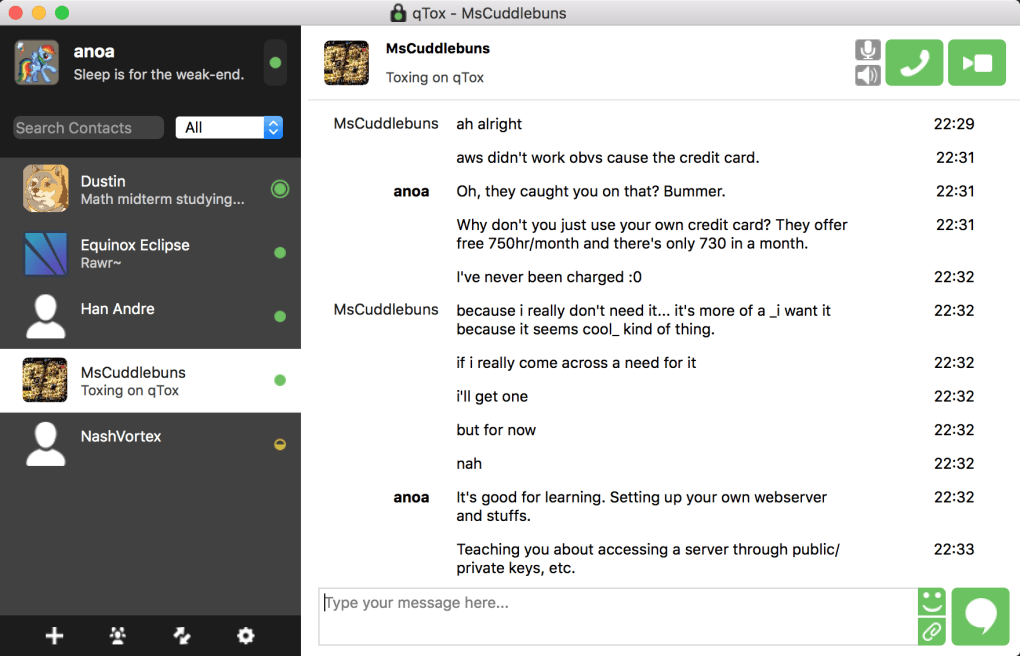
The user interface mirrors familiar tools like Skype or Microsoft Teams, with a contact list on the left and chat windows stacking vertically on the right. Online presence is instantly recognizable thanks to colored status circles: green for online, orange for away, and gray for offline. While its core function is text‑based instant messaging, uTox also supports high‑quality voice calls, video conferences, and unlimited file transfers, making it a versatile choice for both personal and professional communications.
Because the software is community‑driven, you can compile custom builds, add plugins, or tweak the source code to match your workflow. No advertisements, no tracking scripts, and no hidden fees – just a clean, secure environment for conversations that matter.
Key Features
- End‑to‑end encryption for all messages, voice, and video streams.
- Fully decentralized network – no central servers to compromise.
- Unlimited one‑to‑one and group chats with real‑time typing indicators.
- High‑definition voice calls and up to 1080p video conferencing.
- File sharing without size caps – send documents, images, or media of any size.
- Cross‑platform support: Windows, macOS, Linux, Android, and iOS.
- Open‑source codebase on GitHub, enabling community contributions and custom builds.
- Simple, Skype‑style UI that reduces the learning curve for new users.
- Offline messaging support – messages are stored locally until the recipient reconnects.
- No advertisements, telemetry, or data‑selling practices.
Installation & Usage Instructions
Getting started with uTox is straightforward, regardless of whether you run Windows, macOS, or a Linux distribution. First, visit the official uTox GitHub releases page and download the installer that matches your operating system. For Windows users, the .exe file includes a silent installer that automatically adds shortcuts to your desktop and start menu. macOS users will receive a .dmg image; simply drag the uTox icon into the Applications folder. Linux enthusiasts can either use the pre‑compiled AppImage for universal compatibility or compile from source using the provided CMake scripts. Mobile users on Android can download the APK from F-Droid, while iOS builds are available through TestFlight for beta testing.
After installation, launch uTox and create a new Tox ID. The first time you open the app, you’ll be prompted to generate a cryptographic key pair – this process takes a few seconds and produces a unique 76‑character Tox ID that serves as both your address and encryption certificate. Write this ID down or export it as a QR code for easy sharing. To add contacts, click the “Add Friend” button, paste their Tox ID, and send a friend request. Once they accept, you’ll see their status circle change to green, indicating they’re online and ready to chat.
The chat interface works like any modern messenger: type your message in the input box at the bottom, press Enter, and watch the conversation scroll upward. For voice or video calls, click the phone or camera icon next to the contact’s name. The first call will trigger a secure key exchange; subsequent calls are faster because the session keys are cached.
To share files, drag and drop the file onto the chat window or use the paper‑clip icon. uTox will automatically encrypt the file before transmission, ensuring that only the intended recipient can decrypt it. All settings, including audio input/output devices, video resolution, and notification preferences, are accessible through the gear icon in the top‑right corner. The application also supports custom themes and plugins, which you can enable via the “Advanced” tab in the settings menu.
Regular updates are released on the GitHub repository, and the built‑in auto‑updater (available on Windows and macOS) checks for new versions each time you launch the program. Keeping uTox up to date is essential for receiving the latest security patches and feature enhancements. For power users, the command‑line interface (CLI) version of uTox can be launched with specific flags to automate batch file transfers or script‑based messaging, making it a flexible tool for developers and system administrators.
Compatibility, Pros & Cons
uTox runs on virtually every modern platform. On desktop, it supports Windows 7 and newer (including Windows 10/11), macOS 10.12 and later, and major Linux distributions such as Ubuntu, Fedora, and Arch Linux. The application is also packaged for ARM devices, meaning Raspberry Pi users can join the network without hassle. Mobile support covers Android 5.0+ via the F‑Droid repository and iOS 13+ through a TestFlight build. Because uTox is written in C and uses the portable Tox core library, the performance impact is minimal – even on older hardware you’ll notice low CPU usage and modest RAM consumption (typically under 150 MB while active).
Pros
- True end‑to‑end encryption protects every message, call, and file.
- No central servers – eliminates single points of failure and government backdoors.
- Free and open‑source; community can audit and improve the code.
- Unlimited file size transfers – ideal for large media or work documents.
- Cross‑platform support ensures you can stay connected on any device.
- Group chat capability, a feature missing from many anonymous messengers.
- Lightweight UI that feels familiar to users of mainstream chat apps.
- Regular security updates from an active developer community.
- No ads, telemetry, or hidden data‑selling mechanisms.
Cons
- Decentralized network can lead to occasional latency spikes if peers are far apart.
- Initial setup (generating Tox ID, adding contacts) may be confusing for non‑technical users.
- Limited integration with popular enterprise tools (e.g., Slack, Microsoft Teams).
- No official app store presence on iOS, requiring TestFlight for installation.
- Voice and video quality depends heavily on the quality of the underlying internet connection.
Frequently Asked Questions
Is uTox really free and safe to use?
Yes. uTox is released under the GPL‑3.0 license, which guarantees that the source code is publicly available and can be audited for security. All communications are end‑to‑end encrypted, and because the network is peer‑to‑peer, there are no central servers that could be compromised.
Can I use uTox on my smartphone?
Absolutely. Android users can download the APK from F‑Droid, while iOS users can join the TestFlight beta. Both versions retain the core features of text, voice, video, and file sharing.
How does uTox handle group chats?
Group chats are created by selecting multiple contacts and clicking the “New Group” button. The group’s encryption keys are derived from each member’s public key, ensuring that only invited participants can read the conversation.
Do I need an internet connection to use uTox?
A stable internet connection is required for real‑time messaging, voice, and video. However, messages can be queued locally and delivered once the recipient reconnects.
Can I customize the look and feel of uTox?
Yes. The application supports custom themes and can be extended with plugins. Because it’s open‑source, you can also modify the UI directly if you compile your own build.
Conclusion & Call to Action
In an era where digital surveillance is the norm, uTox stands out as a truly private, free, and flexible instant messaging solution. Its decentralized architecture, strong encryption, and lack of advertising make it a compelling alternative to mainstream chat apps that monetize user data. Whether you need a secure channel for personal conversations, a private workspace for a small team, or a platform for sharing large files without bandwidth caps, uTox delivers on all fronts. The learning curve may be a little steeper for non‑technical users, but the community documentation and active forums provide ample support. If you value privacy above all else and are comfortable embracing open‑source tools, uTox is ready to become your go‑to messenger.
Ready to protect your chats? Download uTox today, generate your unique Tox ID, and start communicating securely with friends, family, or colleagues. Stay private, stay free, and keep your conversations out of the hands of advertisers and snoopers.
uTox offers a rare combination of anonymity, feature‑rich communication, and cross‑platform support. While it may lack some enterprise integrations, its security‑first philosophy makes it an excellent choice for anyone serious about privacy.







